Operator guide
Templates
Outcome: you know which templates your customers get on each plan, and where they come from.
The bundled templates
Mailnib ships 79 original templates, plus a Blank start, covering newsletters, announcements, commerce, events and transactional mail such as receipts, tickets and password resets. Each is designed as its own email for an invented sender, from a bookshop's staff picks to a concert e-ticket. Photo slots show sample photos from the sample photo host when it is reachable, and drawn placeholders otherwise; no photograph is part of the download. Every bundled illustration is hand-authored and credited in templates/CREDITS.md. Customers replace the sample images with their own.
Each template lives in its own folder under templates/ in your installation, with a template.json document and a thumbnail.png.
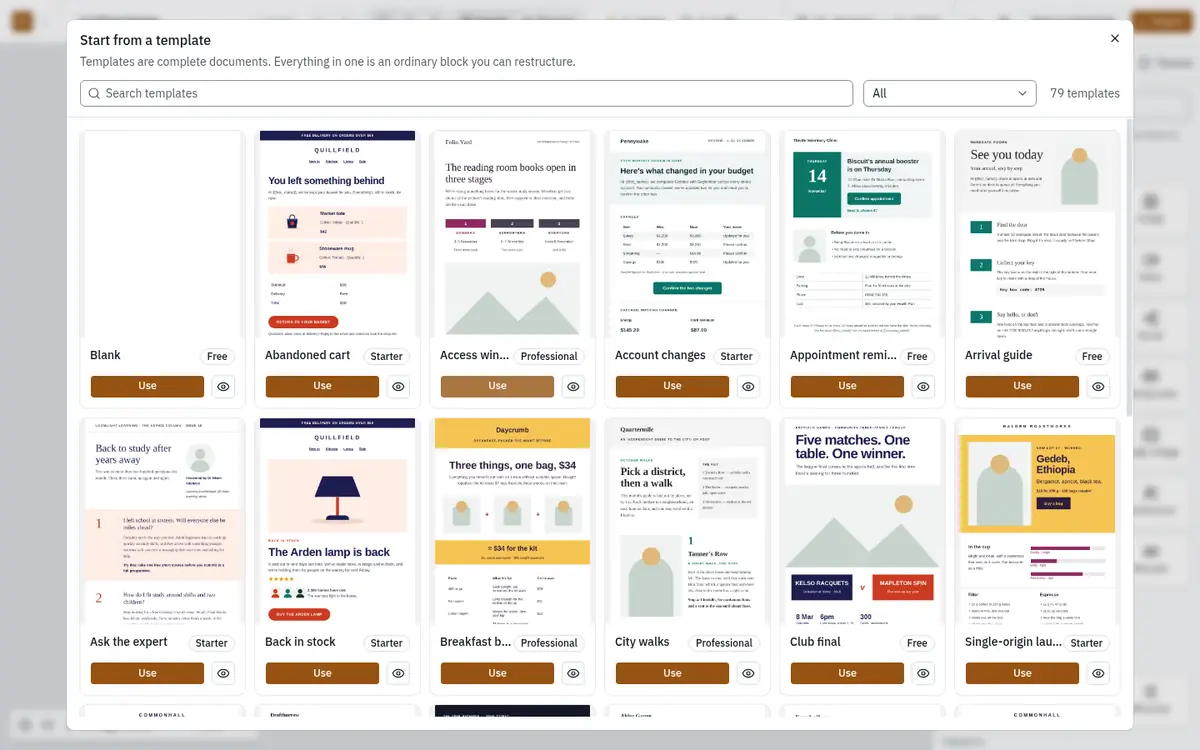
Which plans get which templates
Every template has a tier. A plan unlocks the tiers listed in its allowedTemplateTiers limit:
| Template tier | Templates | Unlocked by |
|---|---|---|
| Free | 8 (including Blank) | every plan |
| Starter | 12 | Starter, Professional, Agency |
| Professional | 10 | Professional, Agency |
A customer on a lower plan still sees locked templates in the chooser, marked with the plan they need, so templates work as an upgrade prompt. To change what a plan unlocks, see Quotas.
Customers' own templates
Any design can be saved as a reusable template for its workspace with Save as template in the editor. Saved templates appear under My templates in the chooser, for that workspace only. How many a workspace can keep is the plan's maxTemplatesSaved limit (none on Free, 10 on Starter, 100 on Professional, unlimited on Agency).
Managing templates from the console
Open Templates in the console to see every template in the order your customers see it, with its category, the plan it needs and whether it is published. Admins and Owners can:
- Reorder templates.
- Change the required plan of a template.
- Publish or unpublish a template from its ⋯ menu. An unpublished template disappears from the chooser but is kept.
- Edit a template in the editor, which saves as you work.
- Add one with New template, either From an existing template… or From a JSON file….
Support operators can see the library but not change it.