User guide
JSON import
Outcome: a design exported as JSON, from this workspace or another installation, is back in your library.
JSON import is how you restore a design you backed up, copy one between workspaces, or move one from another Mailnib installation. It only accepts files made by Export → JSON document.
Import a design
- Open any design in the editor.
- Click ⋯ More actions → Import JSON….
- Under Design file, choose the
.jsonfile. It is checked straight away: you see the design's name and block count, or exactly what is wrong. - Under Import as, choose:
- A new design: your current design stays as it is, and the imported one opens as a new design.
- Replace this design: its blocks replace everything on this canvas. You are asked to confirm, and Undo brings the old content back. The name and theme stay.
- Click Import.
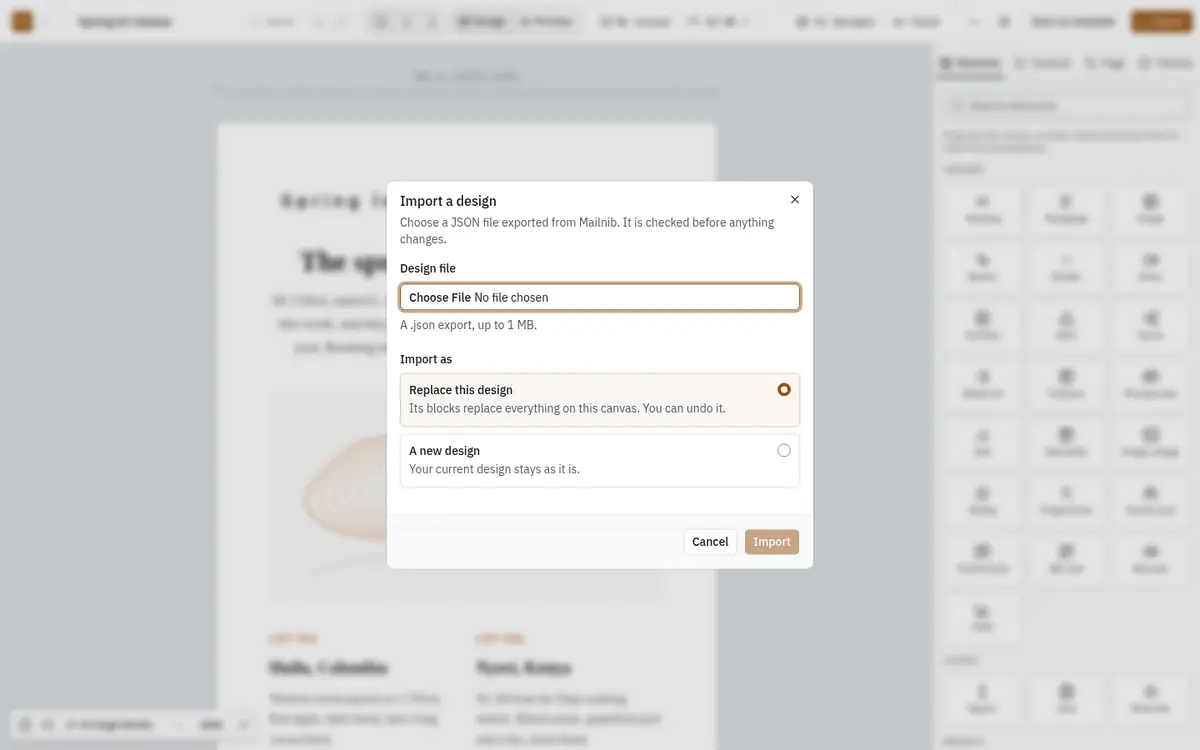
Nothing changes until the file has passed every check. A file that fails is refused whole; it is never half-imported.
When a file is refused
Each message names the problem and, where it can, the block:
| Message begins | What to do |
|---|---|
| "The file is … MB, and imports are limited to 1 MB" | Remove large embedded content from the design and export it again. |
| "The file isn't valid JSON" | Choose the file exactly as exported, without editing it. |
| "This JSON isn't a Mailnib design export" | You chose a different JSON file. Use Export → JSON document. |
| "This design was exported by a newer version of Mailnib" | Update this installation, then import again. See Updating and backups. |
| "… uses an image that isn't in this workspace's media library" | Upload the image to this workspace first, or remove it from the design before exporting. |
| "… is a … block, which this installation doesn't have" | Remove that block in the original design, or update this installation. |
| "You have used every design your plan allows" | Delete a design or upgrade, then import again. |
| "This workspace is read-only" | The plan is not in good standing; nothing can be imported until it is. |
| "Your role can't change designs" | Ask an owner, admin or editor to import it. |
Imports are recorded in the workspace's audit log.