User guide
Export formats
Outcome: a file you can paste or upload into the service you send from.
Open a design and click Export in the toolbar. Choose a format and the file downloads.
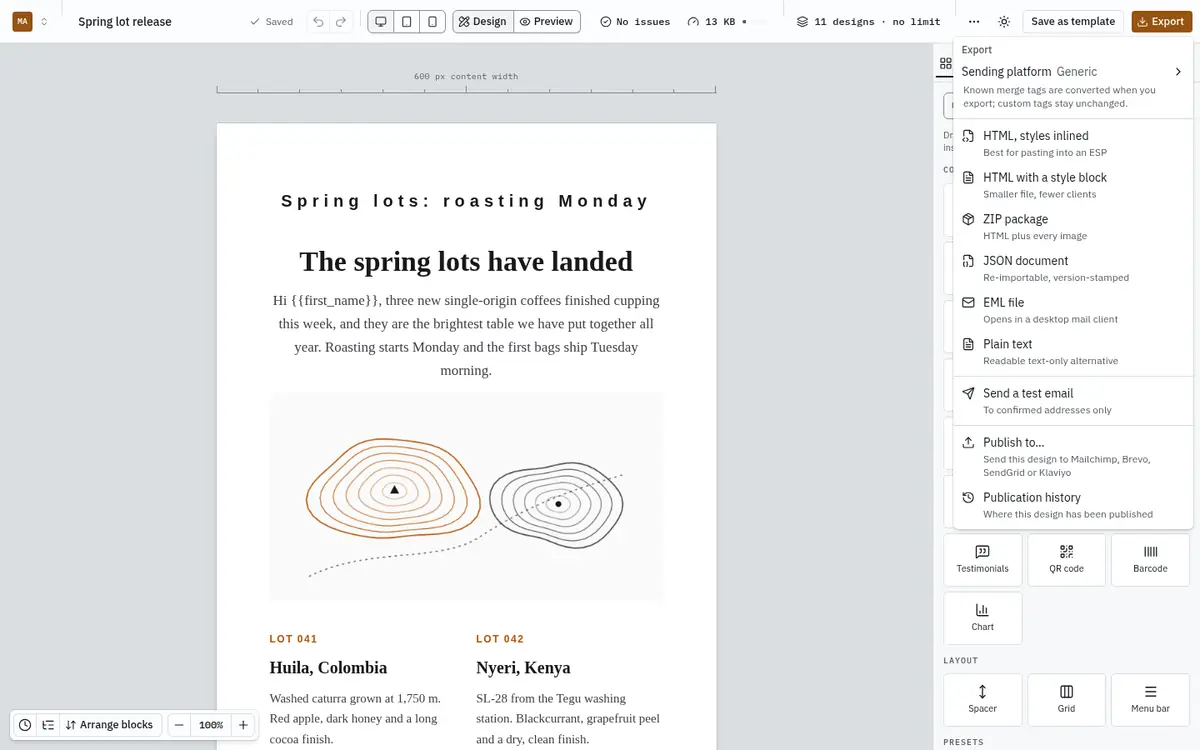
Exports use the last saved version of the design. Wait for Saved in the toolbar before exporting.
Which format to choose
| Format | What you get | Use it when |
|---|---|---|
| HTML, styles inlined | One .html file with every style written on each element. | Almost always. Paste it into Mailchimp, Brevo, Klaviyo, SendGrid, Postmark, Amazon SES or any service that takes custom HTML. For Mailchimp, Brevo, SendGrid and Klaviyo you can skip the paste: publish the design straight into your account. It works in the widest range of inboxes, including Outlook and Gmail. |
| HTML with a style block | One .html file with the styles in a <style> block in the head. | Your service inlines styles itself, or you want a smaller file to edit by hand. Some inboxes ignore <style> blocks. |
| ZIP package | The HTML plus every image it uses, in a folder, with a manifest. | Your service wants images uploaded alongside the HTML, or you are handing the email to a developer. |
| JSON document | The design itself, stamped with its format version. | Backing up a design, or moving it to another workspace or installation with JSON import. It is not an email. |
| EML file | A complete email message. | Opening it in Apple Mail, Outlook or Thunderbird to see it as a real message, or to send it from a desktop client. |
| Plain text | A readable text-only version. | Services that ask for a plain-text alternative alongside the HTML. |
Images in exports
Images in HTML and EML exports point at full https:// addresses on your platform, built from PUBLIC_APP_URL, so they load wherever the email is opened. QR codes are generated and published the same way. Keep the platform online and on the same address for as long as those emails are being read.
Merge tags in exports
Merge tags stay exactly as written, such as {{first_name}}. Your sending service fills them in. If your service uses a different syntax, ask your platform operator to name the tags after its fields; see Merge tags.
Why the HTML looks like tables
Exported HTML uses nested tables and inline styles. That is deliberate: it is what email clients, Outlook above all, render reliably. It is not how you would build a web page, and it should not be "cleaned up".
Export limits
Each export counts toward your plan's exports per month. When you reach the limit, exporting is refused until the next month or an upgrade. Your designs are unaffected.