Run and maintain
Demo mode
Outcome: a public demo of your platform that visitors can explore freely, and that tidies itself up every hour.
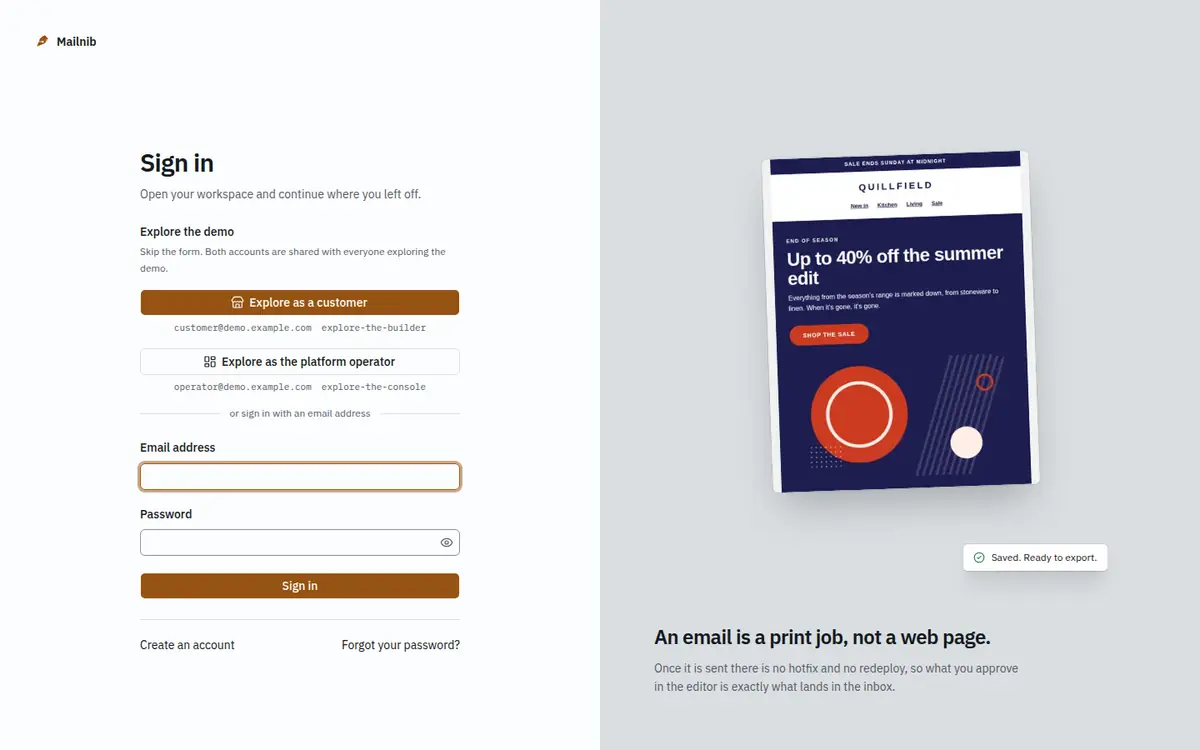
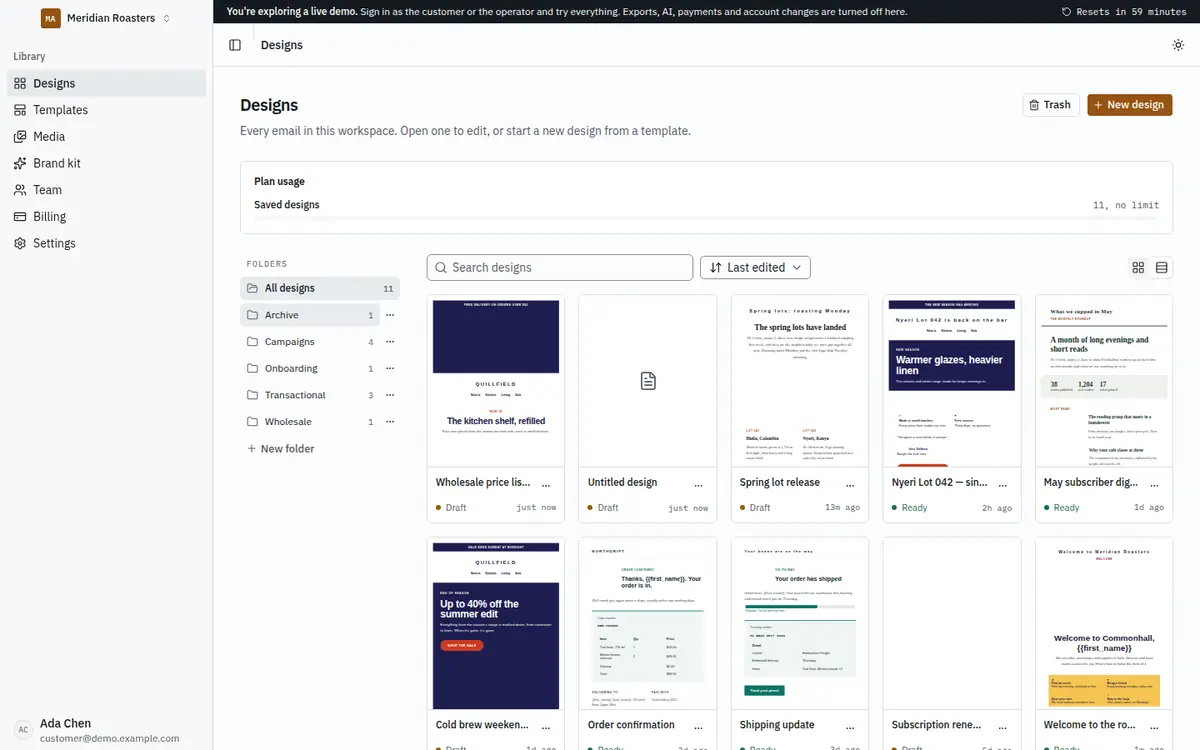
Demo mode turns an installation into a shared showcase: one-click sign-in to a furnished customer workspace and to the operator console, a banner that says when the next reset is due, and server-side guards on anything that could leak a secret, send real mail or spoil the demo for the next visitor.
1. Set the variables
| Variable | Value |
|---|---|
DEMO_MODE | true |
DEMO_RESET_TOKEN | A long random string, for example from openssl rand -hex 32. |
DEMO_RESET_INTERVAL_MINUTES | 60, or whatever matches your reset schedule. It is only used for the countdown banner. |
DEMO_PURCHASE_URL | Optional. Your item page; the landing page's demo section shows a Buy a licence button that opens it. |
The web installer never offers demo mode; you set it in the environment.
2. Seed the demo
From the application folder, with DATABASE_URL set:
pnpm db:migrate
pnpm db:seed
DEMO_MODE=true pnpm demo:seed
demo:seed is safe to run again. It creates:
- a customer,
customer@demo.example.comwith passwordexplore-the-builder, who owns Meridian Roasters on the Professional plan - a second member,
tom@demo.example.com, as an editor - an operator,
operator@demo.example.comwith passwordexplore-the-console - a brand kit, five folders, six tags, ten designs built from the bundled templates, three months of invoices and two confirmed test addresses
These credentials are public on purpose. They are shown on both sign-in pages whenever demo mode is on, and the accounts do not exist unless you run the seed.
What visitors can and cannot do
Editing, exporting, importing, templates, the brand kit, roles, test addresses and every operator screen work normally. These are refused with a "Disabled in the demo" message that says what a real installation does instead:
- Real email. Every message, including test sends, goes to the server log.
- Account changes to the demo accounts: password resets, and removing a seeded member.
- Operator settings that hold secrets: email (SMTP), payments and licence.
- Email platform connections and publishing, because visitors share one workspace and should not paste real API keys into it.
- Real checkout. Plan changes always use the Manual provider, and the demo workspace cannot drop to Free.
- Suspending the demo tenant or ending its sessions from the console.
- Registration, because a new account's confirmation email would never arrive.
- Large uploads: images are capped at 512 KB.
3. Reset on a schedule
There is no timer inside the app, by design. Your host's scheduler calls the reset endpoint with the token, as an X-Demo-Reset-Token header or as Authorization: Bearer <token>. It answers GET as well as POST, for schedulers that only send GET.
A reset deletes what visitors made, restores the seeded designs, plan, members and brand kit, and clears the platform settings. Invoices and audit-log rows are kept, because they can never be deleted.
Render Cron Job, schedule 0 * * * *:
curl -fsS -X POST -H "X-Demo-Reset-Token: $DEMO_RESET_TOKEN" https://demo.example.com/api/demo/resetVercel Cron: set CRON_SECRET to the same value as DEMO_RESET_TOKEN (Vercel sends it as a bearer token), and add to apps/web/vercel.json:
{ "crons": [{ "path": "/api/demo/reset", "schedule": "0 * * * *" }] }cPanel, in Cron Jobs, every hour at minute 0:
curl -fsS -X POST -H "X-Demo-Reset-Token: YOUR_TOKEN" https://demo.example.com/api/demo/reset > /dev/nullAny Linux server, in the crontab:
0 * * * * curl -fsS -X POST -H "X-Demo-Reset-Token: YOUR_TOKEN" https://demo.example.com/api/demo/reset > /dev/nullOr reset directly on the server without HTTP: DEMO_MODE=true pnpm demo:reset.
Check it worked
curl -i -X POST -H "X-Demo-Reset-Token: YOUR_TOKEN" https://demo.example.com/api/demo/reset200 with {"ok":true,"workspaceId":"demo_meridian","designs":10,…} means it worked. 401 means the token is wrong. 404 means demo mode is off or no token is set.