Operator guide
Quotas
Outcome: you know what each plan allows, what a customer sees at a limit, and how to change a limit.
Every plan has ten enforced limits and a publishing switch, all editable in the plan editor: saved designs, team members, storage in MB, saved templates, brand kits, exports per month, test sends per day, AI requests per month, AI images per month and template tiers, plus whether the plan may publish designs to email platforms. Checks run on the server before the corresponding write. A workspace currently keeps one brand kit; a limit of zero blocks its creation, while a positive or unlimited allowance permits it. Reducing the allowance does not delete an existing kit. Updates remain possible while the workspace is writable. Revision retention, element restrictions, output modes, custom branding, footer badges, API access and priority support are not plan limits in this release.
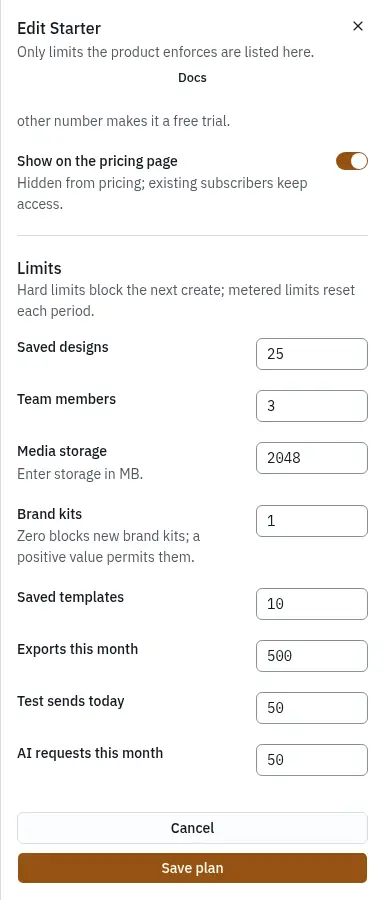
The shipped limits
"Unlimited" is stored as an empty value (null).
| Limit | Key | Free | Starter | Professional | Agency |
|---|---|---|---|---|---|
| Saved designs | maxDesigns | 3 | 25 | unlimited | unlimited |
| Team members | maxTeamMembers | 1 | 3 | 10 | unlimited |
| Media storage (MB) | maxStorageMb | 50 | 2,048 | 10,240 | 51,200 |
| Saved templates | maxTemplatesSaved | 0 | 10 | 100 | unlimited |
| Brand kits | maxBrandKits | 1 | 1 | 5 | unlimited |
| Exports per month | maxExportsPerMonth | 20 | 500 | unlimited | unlimited |
| Test sends per day | maxTestSendsPerDay | 5 | 50 | 200 | 500 |
| AI requests per month | maxAiRequestsPerMonth | 0 | 50 | 300 | unlimited |
| AI images per month | maxAiImagesPerMonth | 0 | 10 | 60 | unlimited |
| Template tiers | allowedTemplateTiers | free | free, starter | + professional | + agency |
| Publishing to email platforms | publishing | no | yes | yes | yes |
There are three kinds:
- Hard limits (designs, members, storage, saved templates, brand kits) block the next thing that would go over. Nothing already made is touched.
- Metered limits (exports per month, test sends per day, AI requests per month, AI images per month) count up and reset each period. Test sends reset at midnight UTC.
- Feature gates (template tiers) cannot fill up; they simply allow or not.
What customers see at a limit
The customer sees a meter in their library, editor and media screens. When they reach a hard limit, the create button is refused by the server with a message that names the limit and offers the upgrade. For example, on Free: "You have used all 3 designs on Free." They can still open, edit and export everything they have.
A workspace that ends up over a limit, after a downgrade or when a payment fails for good, becomes read-only rather than losing anything: members can open, preview and export, but not save or create until the plan fits again.
Change a limit
Open Plans, click the plan, change the limit and save. Leave a limit empty for unlimited; 0 means none.
If workspaces are already on the plan, the editor asks whether to apply the change to them:
- Left off (the default): the new price and limits apply to new subscriptions only. Existing workspaces keep what they signed up for; their terms are kept as earlier terms of the plan, listed under the plans table and hidden from new customers.
- Turned on: every workspace on the plan moves to the new terms at once. Any that end up over a hard limit become read-only, with nothing deleted.
Renaming a plan, changing its description or hiding it never touches existing subscribers. Every create and edit is recorded in the operator audit log.
Manage plan prices, limits and availability. Plans are data, not code. Rename them, reprice them, or add tiers. Changes apply to new subscriptions unless you choose to migrate existing ones.
Existing subscribers keep these earlier terms. New customers cannot choose them. When a plan's price or limits change without migrating, the workspaces already on it keep these terms. They are hidden from new customers and cannot be edited.
Zero blocks new brand kits; a positive value permits them. Each workspace currently stores one brand kit. Zero prevents creation; a positive allowance permits it.